Sorting Algorithm Visualization & Sonification Plugin for Max for Live
I built Soni.f(y, sorts) — a Max for Live device that converts the operations of sorting algorithms into MIDI note sequences, making them playable as an instrument inside Ableton Live.
SortingAlgorithmVisualizations
Visualizing and sonifying sorting algorithms is a popular way to build intuition about algorithmic behavior. Countless developers and educators have produced videos and interactive demos on this theme.
Here are some well-known examples:
15SortingAlgorithmsin6Minutes(TimoBingmann,2013)
Each comparison and swap is mapped to a pitch, creating a distinctive sonic fingerprint for each algorithm. Tens of millions of views.
AlgoRhythmics(SapientiaUniversity)
Sorting algorithms performed as folk dances — a wonderfully embodied take on algorithmic structure. (https://www.youtube.com/user/AlgoRhythmics)
sorting.at(CarloZapponi)
VisuAlgo(NationalUniversityofSingapore)
Step-by-step animated explanations of sorting and other algorithms.
https://visualgo.net/en/sorting
These are all polished visualizations and videos in their own right, designed to be watched. My goal was to take this concept one step further and implement it as a Max for Live device — making sorting algorithms playable as a real-time MIDI instrument inside Ableton Live.
Max/MSPandMaxforLive
Max/MSP
Max/MSP is a visual programming environment by Cycling '74, widely used for music, video, and interactive media.
Programs are built as patches (.maxpat) by wiring together objects in a dataflow style.
One of Max's strengths is its [js] object, which lets you embed JavaScript directly in a patch for logic-heavy tasks that would be awkward to express visually.
MaxforLive(M4L)
Max for Live (M4L) integrates Max into Ableton Live, allowing you to build custom MIDI effects, audio effects, and instruments that run directly in a Live set and are distributed as .amxd files.
Cycling '74 was acquired by Ableton in 2017. Max for Live is now available as part of Ableton Live Suite or as a separate license. (Cycling '74 Joins Ableton, 2017)
Soni.f(y,sorts)
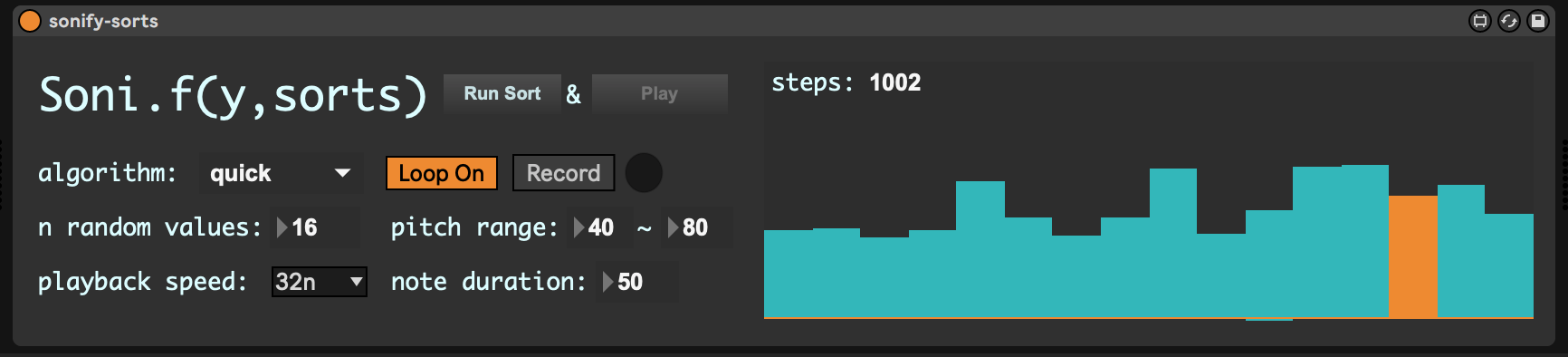
Soni.f(y, sorts) maps each step of a sorting algorithm (comparisons, swaps, insertions) to a MIDI note, which is then routed to any instrument in Ableton Live.
SupportedAlgorithms
- Selection Sort
- Insertion Sort
- Quick Sort
- Merge Sort
- Heap Sort
Overview
[Input sequence (MIDI note numbers)]
        ↓
[sort.js — inside Max [js] object]
  · Runs the full sort, recording every operation in stepHistory[]
        ↓
[One step replayed per bang]
  outlet0 : current sequence state
  outlet1 : accessed note + adjacent notes → MIDI out
  outlet2 : index pointer sequence
        ↓
[Ableton Live MIDI instrument]
The patch loads sort.js into a [js] object via [js sort.js]. When it receives the sort message it pre-computes the entire sort and stores all operations in a history array. Each subsequent bang replays one step from that history, outputting the accessed MIDI notes to Live. When the history is exhausted, outlet 6 fires a bang to signal completion.
JavaScriptImplementation(sort.js)
Max's [js] object runs ECMAScript 5-compatible JavaScript (Max JS Object Reference).
The core data structure is stepHistory — an array that records every elementary operation performed during the sort:
inlets = 2;
outlets = 7;

var availableAlgorithms = [
  "bubble",
  "selection",
  "insertion",
  "quick",
  "merge",
];
var selectedAlgorithm = "bubble";
var stepHistory = Array();

// swap two elements (type 0)
function swap(array, i, j, saveHistory) {
  var tmp = array[i];
  array[i] = array[j];
  array[j] = tmp;
  if (saveHistory) stepHistory.push([0, i, j]);
}

// copy element at j to position i (type 1)
function insert(array, i, j, saveHistory) {
  array[i] = array[j];
  if (saveHistory) stepHistory.push([1, i, j]);
}

// write a specific value to position i (type 2)
function insertValue(array, i, value, saveHistory) {
  array[i] = value;
  if (saveHistory) stepHistory.push([2, i, value]);
}
Each sort function (bubbleSort, selection_sort, insertionSort, quickSort, mergeSort) calls these primitives with saveHistory = true, accumulating every atomic operation into stepHistory.
Playbackviabang
function bang() {
  if (bangCount === 0) playSequence = inputArray.slice(); // reset on first step

  if (bangCount === stepHistory.length) {
    outlet(6, "bang"); // signal sort complete
    bangCount = 0;
    return;
  }

  var op = stepHistory[bangCount];
  // re-apply swap / insert / insertValue to playSequence
  // ...

  // output accessed note and its neighbors as MIDI
  outlet(1, [
    playSequence[Math.max(0, idx - 1)],
    playSequence[idx],
    playSequence[Math.min(playSequence.length - 1, idx + 1)],
  ]);
  outlet(0, playSequence); // current state
  bangCount++;
}
Separating the sort computation from its playback means the tempo is fully independent — you can use Ableton Live's transport, a [metro] object, or any other bang source to step through the sort at any speed.
Usage
- Drop
sonify-sorts.amxdonto a MIDI track in Ableton Live. - Set the input sequence (a list of MIDI note numbers, e.g. a shuffled scale) on the device.
- Choose an algorithm and press sort to pre-compute the step history.
- Turn on play to step through the sort in sync with tempo. Each step outputs MIDI notes.
- Route the MIDI output to any Live instrument (synth, sampler, etc.) and listen to the algorithm play itself.
Sorting algorithm visualizations are a staple of CS education. Implementing this as a Max for Live device makes it possible to experience and perform sorting algorithms as "music" inside Ableton Live.
Using Max's [js] object means complex algorithm logic can be written in familiar JavaScript rather than having to express it through visual patching — a significant advantage. The differences between algorithms — the rhythm patterns and note density of each sort — translate into distinctly different musical textures, which makes for an interesting way to compare algorithms from a musical perspective.
Links
- Repository: atsukoba/sonify-sorts
- Max/MSP: https://cycling74.com/products/max
- Max for Live: https://www.ableton.com/en/max-for-live/
- Max JS Object Reference: https://docs.cycling74.com/max8/refpages/js