Creating a web application to send OSC locally with nodejs (SocketIO, Express)
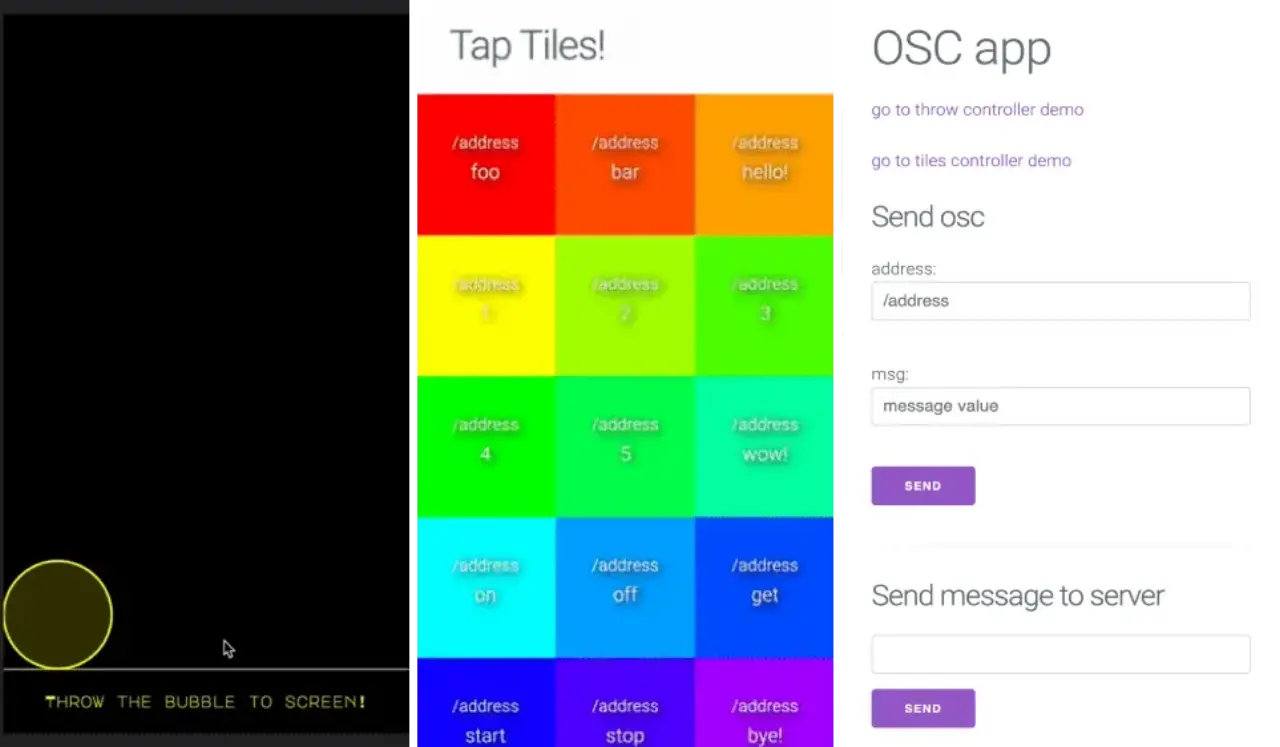
I prototyped a web application that allows anyone to participate in an artwork through OSC. Repository.
OSC(OpenSoundControl)
What is OSC: See opensoundcontrol.org or Wikipedia.
yoppa.org's openFrameworks – Network collaboration using OSC (Open Sound Control) is very helpful.
It is very convenient because you can send something like MIDI over UDP to Max/MSP. This time, I will prototype a tool to make exhibitions more interactive by accepting this locally not only on the LAN but also from smartphones on the Internet.
(You can run the application locally by referring to the repository below)
Overview
Set up a server with nodejs/express, and capture the user's movements on the application with websocket, which is lightweight and can be used bidirectionally. Implement up to exposing the server set up on localhost with ngrok and outputting its URL (and local IP address) to a QR code.
Write a light front-end to create a demo, and check if a simple button and the message corresponding to that button can be sent to the local OSC.
express
npm install express-generator -g
express --view=ejs osc-webapp
cd osc-webapp
npm install
Use socket.io.
const app = express();
const http = require("http").Server(app);
const io = require("socket.io")(http);
osc
Use node-osc (npm: node-osc). An example of usage is as follows:
const osc_portnum = 5050;
const client = new osc.Client("127.0.0.1", osc_portnum);

io.of("osc").on("connection", (socket) => {
  socket.on("message", (obj) => {
    console.log("osc: " + obj);
    obj = JSON.parse(obj);
    let sendObj = new osc.Message(obj.address);
    sendObj.append(obj.args);
    client.send(sendObj);
    let dt = new Date();
    io.of("osc").send(
      `${dt.toFormat("HH24:MI:SS")} : osc message received: ${obj.args}`,
    );
  });
});
qrcode
Use os, qrcode (npm: qrcode) to make the local IP address and the URL generated by ngrok (npm: ngrok) into a QR code.
const ngrok = require("ngrok");
const qrcode = require("qrcode");

// get local ip addresses
let interfaces = os.networkInterfaces();
let addresses = [];
for (let k in interfaces) {
  for (let k2 in interfaces[k]) {
    let address = interfaces[k][k2];
    if (address.family === "IPv4" && !address.internal) {
      addresses.push(address.address);
    }
  }
}
console.log(`local ip addresses: ${addresses}`);
console.log(`FOR LOCAL NEWORK PARTICIPANTS`);
qrcode.toString(
  `http://${addresses[0]}:${portnum}`,
  { type: "terminal" },
  (err, str) => {
    console.log(str);
  },
);

// make ngrok tunnel
console.log(`FOR WWW PARTICIPANTS`);
(async () => {
  let url = await ngrok.connect(portnum);
  console.log("ngrok URL: " + url);
  qrcode.toString(url, { type: "terminal" }, (err, str) => {
    console.log(str);
  });
})();
Usage
npm start
This will generate a QR code, and you can send OSC by sharing it. If you are on the same LAN, the top QR code is fine. Specify the port number in the config file, and the demo hardcodes the OSC message to send (for now) in main.js on the client side, so please edit it as appropriate.
