Easy Hand Tracking with MediaPipe and OSC Integration for Real-time Toys
MediaPipe is an open-source machine learning framework presented by Bazarevsky et al. at CVPR 2019.
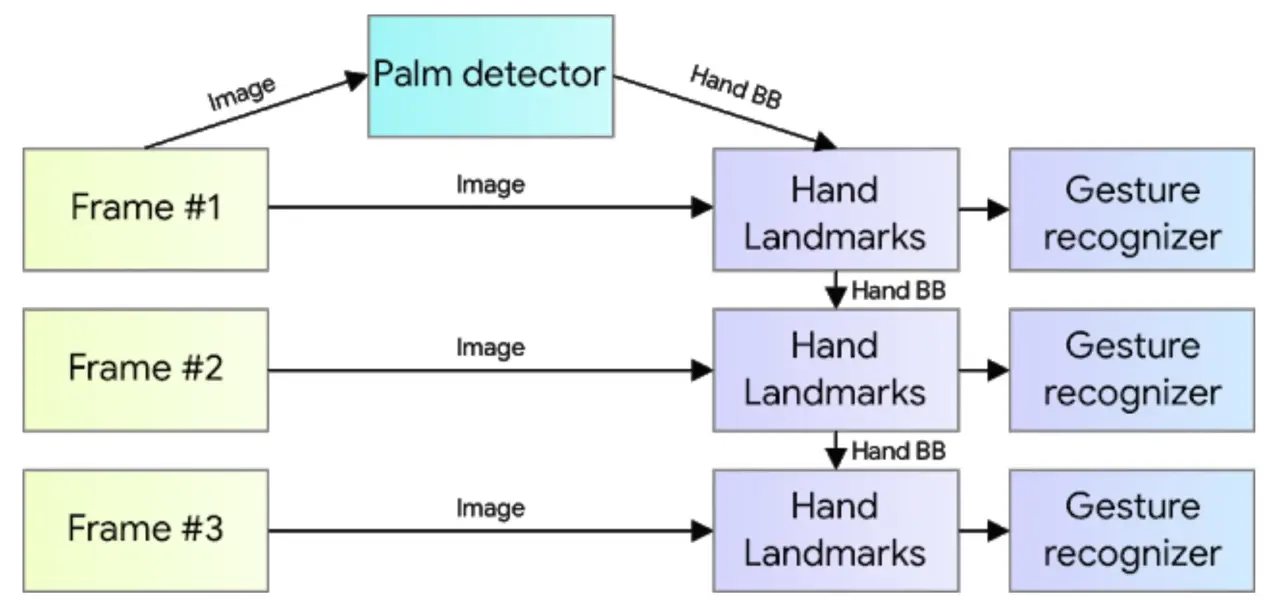
The hand tracking feature used there combines a single-shot palm detection algorithm and a hand landmark model (Google AI Blog: On-Device, Real-Time Hand Tracking with MediaPipe).
The shape of the hand can be obtained as the coordinates of the following landmarks. Inference runs every frame, and values in cv coordinates can be obtained.
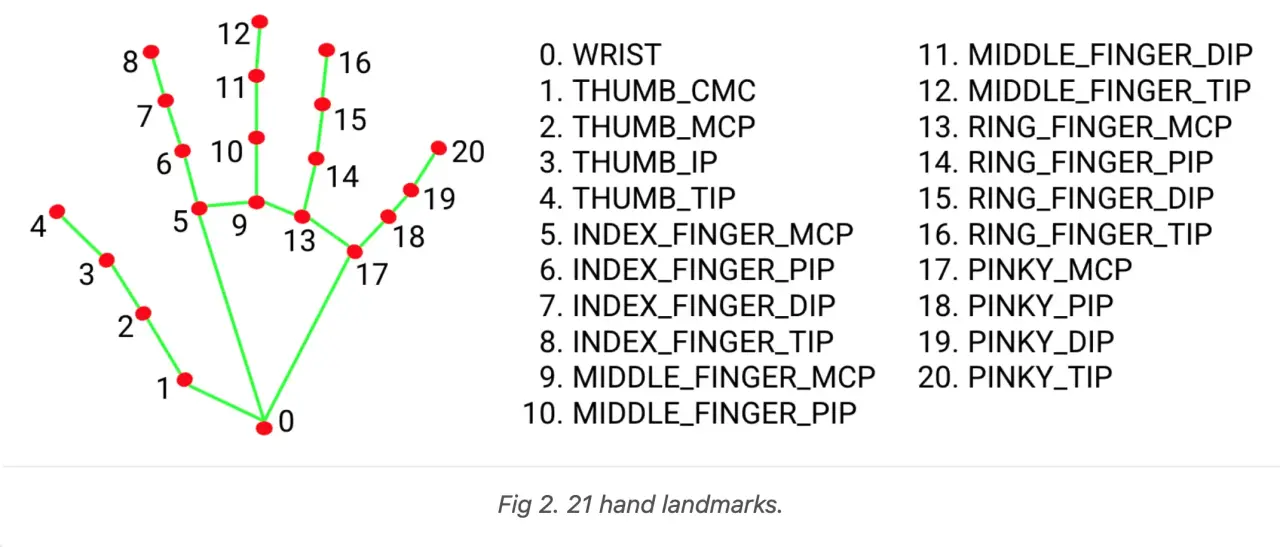
The returned landmark object allows you to extract the float coordinates as follows:
for hand_idx, landmarks in enumerate(multi_hand_landmarks):
    for point_idx, points in enumerate(landmarks.landmark):
        print(f"Hand: {hand_idx}, {HAND_LANDMARK_NAMES[point_idx]},"
                      + f"x:{points.x} y:{points.y} z:{points.z}")
At this time, HAND_LANDMARK_NAMES is in the following order:
HAND_LANDMARK_NAMES = [
    "wrist",
    "thumb_1",
    "thumb_2",
    "thumb_3",
    "thumb_4",
    "index_1",
    "index_2",
    "index_3",
    "index_4",
    "middle_1",
    "middle_2",
    "middle_3",
    "middle_4",
    "ring_1",
    "ring_2",
    "ring_3",
    "ring_4",
    "pinky_1",
    "pinky_2",
    "pinky_3",
    "pinky_4"
]
This time, we will prototype data transmission via Open Sound Control for interactive artworks or gesture recognition using Wekinator, etc., using this real-time hand tracking by MediaPipe.
Script
# Atsuya Kobayashi 2020-12-22
# Reference: https://google.github.io/mediapipe/solutions/hands
# LICENCE: MIT

from itertools import chain

import mediapipe as mp
from cv2 import cv2
from pythonosc import udp_client

IP = "127.0.0.1"
PORT = 7474
VIDEO_DEVICE_ID = 0
RELATIVE_AXIS_MODE = True

HAND_LANDMARK_NAMES = [
    "wrist",
    "thumb_1",
    "thumb_2",
    "thumb_3",
    "thumb_4",
    "index_1",
    "index_2",
    "index_3",
    "index_4",
    "middle_1",
    "middle_2",
    "middle_3",
    "middle_4",
    "ring_1",
    "ring_2",
    "ring_3",
    "ring_4",
    "pinky_1",
    "pinky_2",
    "pinky_3",
    "pinky_4"
]


def extract_detected_hands_points(multi_hand_landmarks,
                                  send_osc_client=None):

    if multi_hand_landmarks is not None:
        for hand_idx, landmarks in enumerate(multi_hand_landmarks):
            for point_idx, points in enumerate(landmarks.landmark):

                # if you want to check data on console
                print(f"Hand: {hand_idx}, {HAND_LANDMARK_NAMES[point_idx]},"
                      + f"x:{points.x} y:{points.y} z:{points.z}")
                """
                if you want to send data to addresses correspoding
                to landmarks names on detected hands, use berow
                """
                # if send_osc_client is not None:
                #     send_osc_client.send_message(f"/{HAND_LANDMARK_NAMES[point_idx]}",
                #                                  [points.x, points.y])

            """if you want to send data to single input address, use berow"""
            if send_osc_client is not None:
                send_osc_client.send_message(
                    f"/YOUR_OSC_ADDRESS",
                    list(chain.from_iterable([[p.x, p.y] for p in landmarks.landmark])))


if __name__ == "__main__":

    mp_drawing = mp.solutions.drawing_utils
    mp_hands = mp.solutions.hands

    hands = mp_hands.Hands(
        min_detection_confidence=0.5, min_tracking_confidence=0.5)

    cap = cv2.VideoCapture(VIDEO_DEVICE_ID)

    osc_client = udp_client.SimpleUDPClient(IP, PORT)

    while cap.isOpened():
        success, image = cap.read()
        if not success:
            print("Ignoring empty camera frame.")
            # If loading a video, use 'break' instead of 'continue'.
            continue

        image = cv2.cvtColor(cv2.flip(image, 1), cv2.COLOR_BGR2RGB)
        image.flags.writeable = False
        results = hands.process(image)
        extract_detected_hands_points(results.multi_hand_landmarks,
                                      send_osc_client=osc_client)
        image.flags.writeable = True
        image = cv2.cvtColor(image, cv2.COLOR_RGB2BGR)
        if results.multi_hand_landmarks:
            for hand_landmarks in results.multi_hand_landmarks:
                mp_drawing.draw_landmarks(
                    image, hand_landmarks, mp_hands.HAND_CONNECTIONS)
        cv2.imshow('Detected Hands', image)

        if cv2.waitKey(5) & 0xFF == 27:
            break

    hands.close()
    cap.release()