Created a LINE bot to search Wikipedia
Built with flask, line-bot-sdk, and wikipedia, and deployed to heroku.
FinalResult
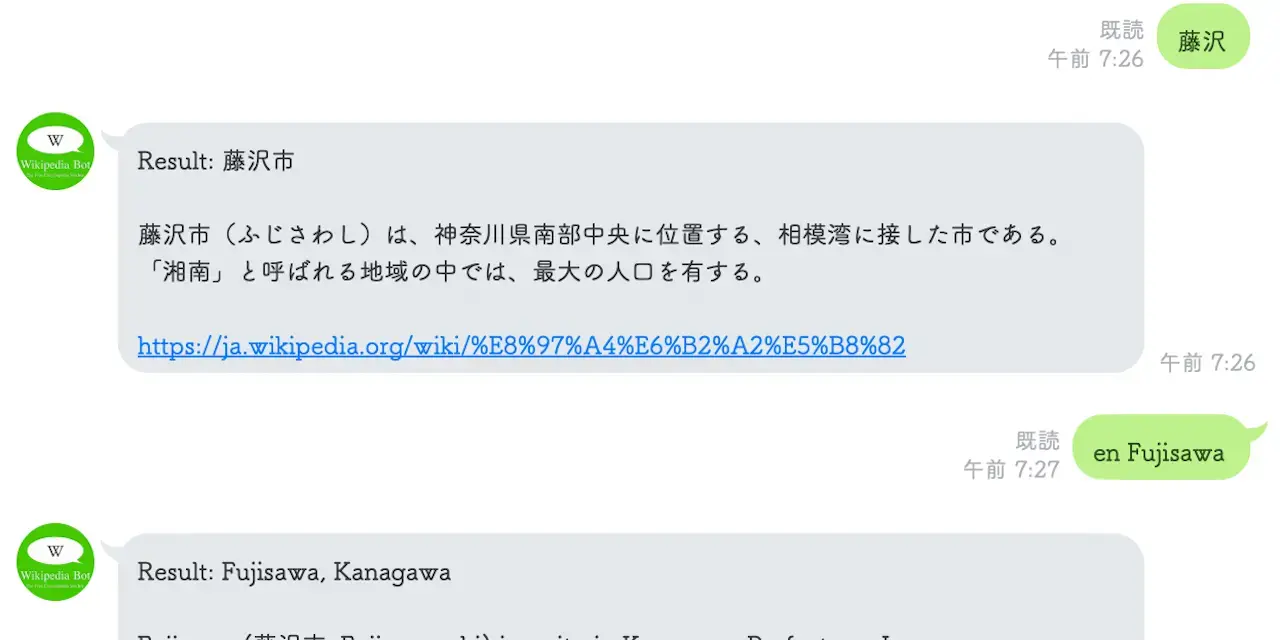
Preparation
Since I want to run pip install -r requirements.txt, I wrote the three libraries mentioned above in requirements.txt, and completed the Heroku and LINE@ settings (obtained the channel access token and channel secret). I also placed runtime.txt and Procfile. Basically, I imitated Running a LINE BOT (python) on Heroku.
AboutWikipedia
Everyone's favorite Wikipedia.
pip install wikipedia
The library Wikipedia installed with this is very convenient, and I interpret it as a wrapper for the Media Wiki API for Python.
It should be something that hits the API with requests, parses the markup with something like BeautifulSoup4, and returns it.
import wikipedia

wikipedia.set_lang("ja")
After setting it to Japanese Wikipedia with this,
wikipedia.search("string")
returns a list of each page name, and the Wikipedia page to be written has that name (title) as its ID,
wikipedia.page("page name")
allows you to get a wikipedia.WikipediaPage object. This page object has attributes such as categories, links, content, and summary, which are basically lists of URLs or strings.
>>> help(wikipedia.WikipediaPage)
>>>
"""
categories
    List of categories of a page.
content
    Plain text content of the page, excluding images, tables, and other data.
coordinates
    Tuple of Decimals in the form of (lat, lon) or None
images
    List of URLs of images on the page.
links
    List of titles of Wikipedia page links on a page.
    Only includes articles from namespace 0, meaning no Category, User talk, or other meta-Wikipedia pages.
parent_id
    Revision ID of the parent version of the current revision of this
    page. See ``revision_id`` for more information.
references
    List of URLs of external links on a page.
    May include external links within page that aren't technically cited anywhere.
revision_id
    Revision ID of the page.
    The revision ID is a number that uniquely identifies the current
"""
For the LINE Bot I'm making this time, I decided to make something that selects one page from the candidates obtained for the search word, and returns the summary of that page (the overview right after the title, displayed in OGP, etc.?) and a link to the page to the LINE chat room.
Files,etc.
.
├── Procfile
├── README.md
├── __pycache__
│   ├── app.cpython-36.pyc
│   └── parser.cpython-36.pyc
├── app.py
├── assets
│   └── img
│       └── linebot-icon-resized.webp
├── messenger.py
├── parser.py
├── requirements.txt
├── runtime.txt
└── test.py
app.py
Next, I'll quickly write the application part based on flask, but this is also mostly copy-paste. linebot hides the tedious parts, which is very convenient.
from flask import Flask, request, abort

from linebot import (
    LineBotApi, WebhookHandler
)
from linebot.exceptions import (
    InvalidSignatureError
)
from linebot.models import (
    MessageEvent, TextMessage, TextSendMessage,
)

import parser
import os

app = Flask(__name__)

YOUR_CHANNEL_ACCESS_TOKEN = os.environ.get("YOUR_CHANNEL_ACCESS_TOKEN")
YOUR_CHANNEL_SECRET = os.environ.get("YOUR_CHANNEL_SECRET")

line_bot_api = LineBotApi(YOUR_CHANNEL_ACCESS_TOKEN)
handler = WebhookHandler(YOUR_CHANNEL_SECRET)


@app.route("/callback", methods=['POST'])
def callback():
    # get X-Line-Signature header value
    signature = request.headers['X-Line-Signature']

    # get request body as text
    body = request.get_data(as_text=True)
    app.logger.info("Request body: " + body)

    # handle webhook body
    try:
        handler.handle(body, signature)
    except InvalidSignatureError:
        print("Invalid signature. Please check your channel access token/channel secret.")
        abort(400)

    return 'OK'


@handler.add(MessageEvent, message=TextMessage)
def handle_message(event):
    line_bot_api.reply_message(
        event.reply_token,
        TextSendMessage(text=parser.answer(event.message.text)))


if __name__ == "__main__":
    port = int(os.getenv("PORT", 5000))
    app.run(host="0.0.0.0", port=port)
A sample using flask as app.py is published in the official repository of line-bot-sdk-python.
[sample] app.py
Also, this time I used what was solidly posted in the README in the first place. sample code on GitHub
parser.py
The parser has language settings as module variables. Is it a bit subtle as a design? Module (global) variables.
usage() for when you use it wrong or want to show help is not implemented.
Surprisingly, the number of characters in WikipediaPage.summary is long, so I cut it off at 1500 characters or more in case it hits the upper limit of the Messaging API.
import wikipedia


# init language setting
lang = "ja"
wikipedia.set_lang(lang)

def init() -> None:
    global lang
    wikipedia.set_lang(lang)


def tokenize(text: str) -> list:
    """Tokenize input Sentence to list of word"""
    splited = text.split()
    if len(splited) == 1:
        return splited
    elif len(splited) == 2:
        if splited[0] in wikipedia.languages.fn().keys():
            change_lang(splited[0])
        return splited[1]
    else:
        usage()

def search(text: str, rank=0) -> "wikipedia.wikipedia.WikipediaPage":
    """Search Wikipedia page by Word
    arg
    ---
    rank : int : Return the contents of the search result of the set rank.
    """
    try:
        page = wikipedia.page(wikipedia.search(text)[rank])
    except wikipedia.exceptions.DisambiguationError:
        page = wikipedia.page(wikipedia.search(text)[rank+1])
    return page


def encode(page: "wikipedia.wikipedia.WikipediaPage", threshold=1500) -> str:
    """Transform data into the text for LINE message
    """
    summary = page.summary
    if len(summary) > threshold:
        summary = summary[:threshold] + "..."

    return f"Result: {page.title}\n\n{summary}\n\n{page.url}"


def answer(text: str) -> str:
    init()
    word = tokenize(text)
    page = search(word)
    return encode(page)


def change_lang(language: str) -> None:
    wikipedia.set_lang(language)
    return

def usage():
    pass

if __name__ == "__main__":
    import argparse

    parser = argparse.ArgumentParser()
    parser.parse_args()
Just in case, it's properly in PEP8 style, and I'm writing type hints and docstrings. I want to make it a habit.
Deployment,etc.
$ heroku login
$ heroku create heroku-line-bot
$ heroku config:set LINE_CHANNEL_SECRET="<Channel Secret>"
$ heroku config:set LINE_CHANNEL_ACCESS_TOKEN="<Access Token>"
$ git push heroku master