楽曲データのテキスト検索をAWS S3 Vectorsでお手軽に試す
AWS S3 Vectors を使うと,ベクトル DB を別途立てずに S3 だけでベクトルを用いた類似度検索が可能とのことで。
今回は楽曲データセット MusicCaps の音声 (キャプション) を CLAP でエンベディングして,
「テキストで楽曲を検索する」マルチモーダル検索システムを,aws-cdk と uv で一瞬で組みます。
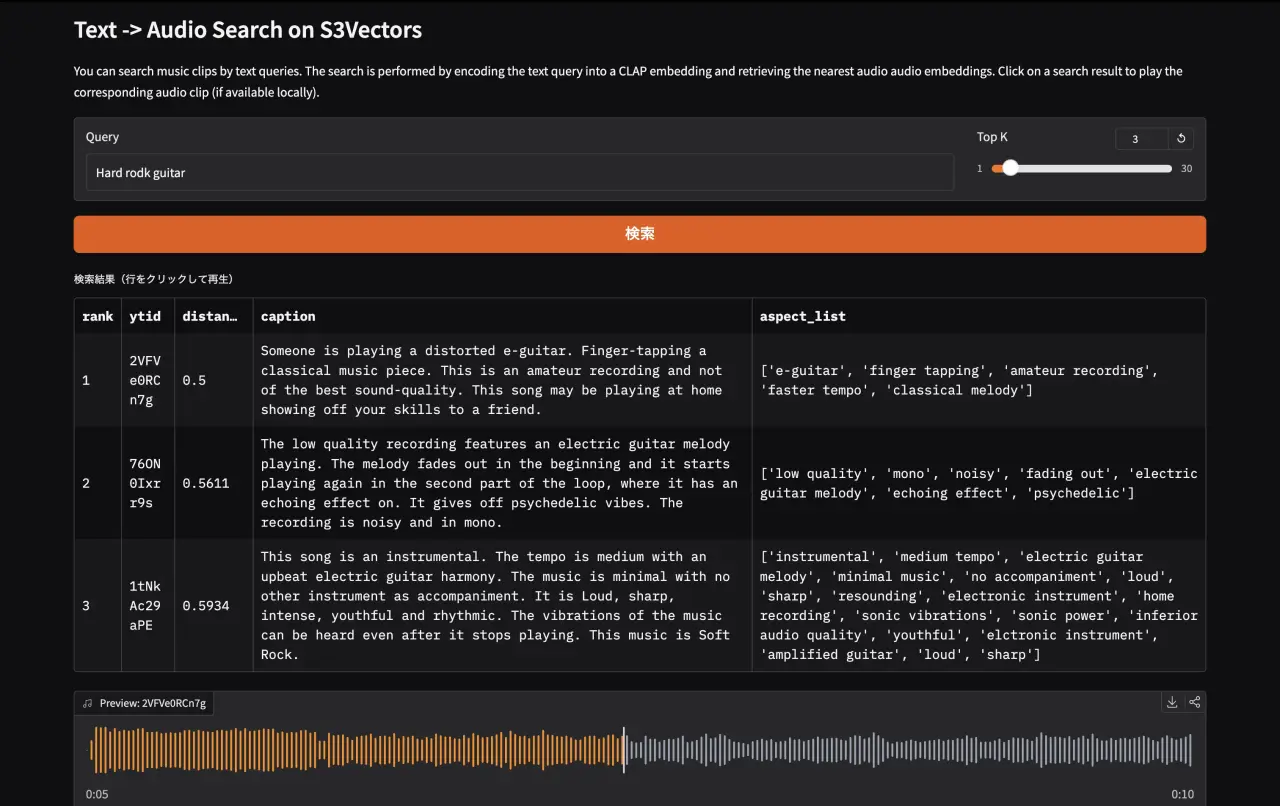
gradioによるデモアプリでは,テキストでの検索が可能になっています。
実装のコードは以下のリポジトリに。
atsukoba/MusicCap-S3VectorsSearch-CLAP
S3Vectors
Amazon S3 Vectors はS3 ネイティブのベクトルストレージ機能で 2025年7月 に GA(一般公開)になったとのこと。
Amazon S3 Vectors is the first cloud storage with native vector support at scale. — AWS Blog: Introducing Amazon S3 Vectors
ベクトル検索をやろうとすると Pinecone・Weaviate・pgvector などを別途用意する必要がありましたが,S3 Vectors では「ベクトルバケット(vector bucket)」という新しいバケット種別が追加され,オブジェクトストレージと同じ感覚でベクトルを保存・検索できるそうです。
- コスト: 専用ベクトル DB に比べ最大 90% のコスト削減が可能らしい
- スケール: 1 バケットあたり最大 10,000 のベクトルインデックス,各インデックスに数千万ベクトルを格納可能らしい
- サーバーレス: インフラのプロビジョニング不要,従量課金
- AWS エコシステム統合: Amazon Bedrock Knowledge Bases や SageMaker Unified Studio とのネイティブ連携 (今回は使わない)
boto3での操作
boto3 の新しいクライアント s3vectors で操作でき,ベクトルの投入は put_vectors,検索は query_vectors を使う。
import boto3

s3vectors = boto3.client("s3vectors", "ap-northeast-1")

s3vectors.put_vectors(
    vectorBucketName="music-cap-vectors",
    indexName="music-embeddings",
    vectors=[
        {
            "key": "track_001",
            "data": {"float32": [0.12, -0.34, ...]},
            "metadata": {"caption": "A soft piano melody ...", "ytid": "abc123"},  # 任意のメタデータ
        },
    ],
)

response = s3vectors.query_vectors(
    vectorBucketName="music-cap-vectors",
    indexName="music-embeddings",
    queryVector={"float32": [0.05, -0.28, ...]},
    topK=10,
    returnMetadata=True,
    returnDistance=True,
)
MusicCaps
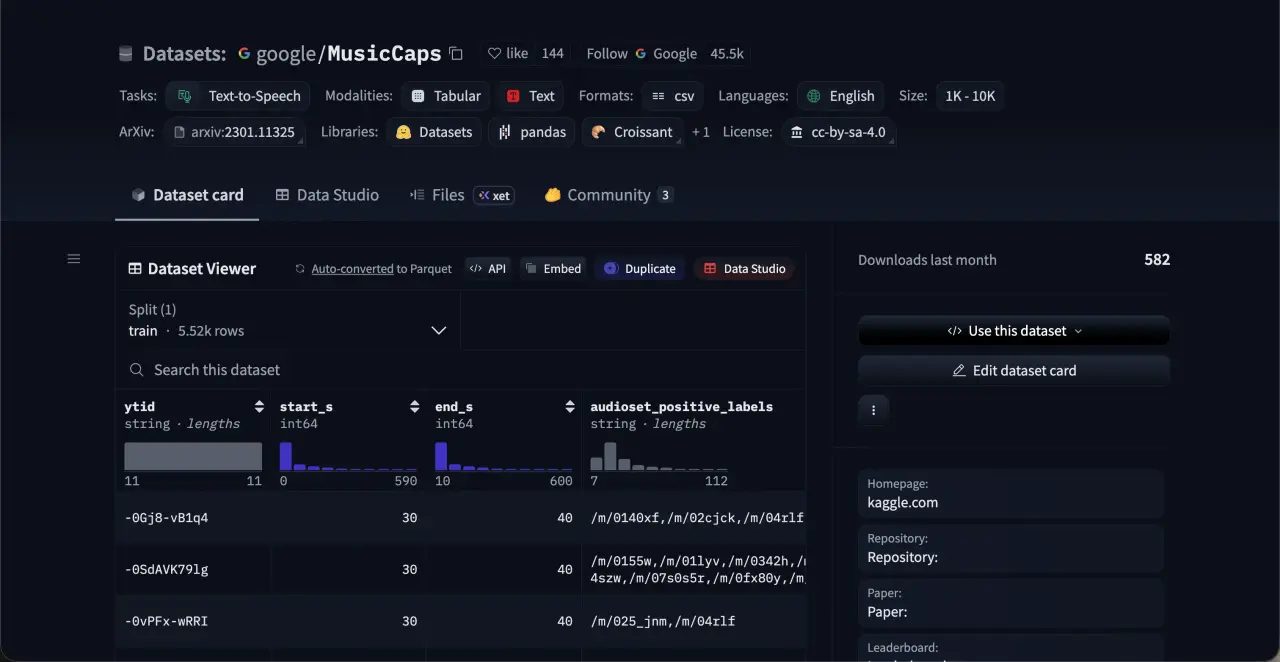
MusicCaps は Google が公開した音楽キャプションデータセットで,5,521 件の音楽クリップとテキスト説明のペアからなる。
- 各クリップは YouTube から取得した 10 秒間の音楽
- 説明文はプロの音楽家が書いた平均 4 文程度の自由記述(ジャンル・楽器・ムード・テンポなどを記述)
- アスペクトリスト("mellow piano melody", "fast-paced drums" などのキーワード群)も付属
- ライセンス:
CC-BY-SA 4.0
データセットのメタデータには ytid(YouTube ID),start_s,end_s,caption,aspect_list 等のカラムがある。実際の音声は YouTube から yt-dlp で取得する。
YouTubeの利用規約上、動画のダウンロードは原則禁止なので研究・学習目的に限定してください
from datasets import load_dataset

ds = load_dataset("google/MusicCaps", split="train", token=HF_TOKEN)
# 5521 サンプル
# Features: ytid, start_s, end_s, audioset_positive_labels, aspect_list, caption, ...
音声ファイルの取得は yt-dlp で,--download-sections オプションで必要な区間だけを切り出す。
yt-dlpのバージョンやYoutube側の状況によってはダウンロードができないケースがいくつかあるようです
yt-dlp --quiet --no-warnings -x --audio-format wav -f bestaudio \
    -o "{ytid}.wav" \
    --download-sections "*{start_s}-{end_s}" \
    "https://www.youtube.com/watch?v={ytid}"
注意: 取得できないクリップも一定数存在するのと,datasetのダウンロード時に
HF_TOKENを設定しないと 32 サンプルに制限されるため,.envに設定しておく
CLAP:音声とテキストの共同埋め込みモデル
CLAP (Contrastive Language-Audio Pretraining) は,LAION が公開したオープンソースのマルチモーダルモデルで,OpenAI の CLIP(画像×テキスト)の音声版と理解。
Large-scale Contrastive Language-Audio Pretraining with Feature Fusion and Keyword-to-Caption Augmentation — Wu et al., ICASSP 2023 (arXiv
.06687)
アーキテクチャ
CLAP は 音声エンコーダ(HTSAT ベース)とテキストエンコーダ(RoBERTa ベース)を持ち,両者の埋め込みを同一の潜在空間にマッピングするようにContrastive Learningする。
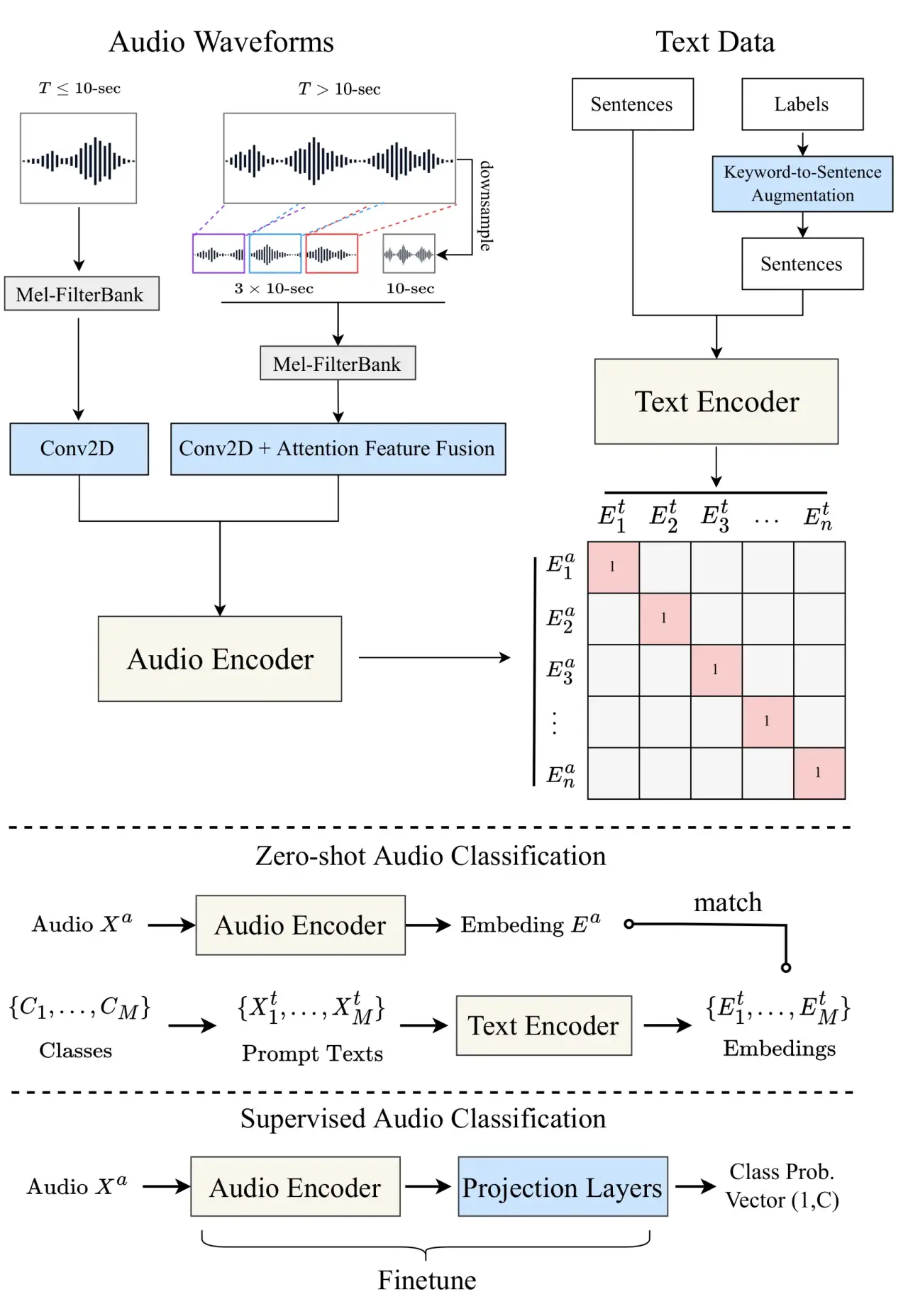
これにより,「テキストの埋め込み」と「音声の埋め込み」が同じ空間上で比較できる。
HuggingFaceTransformersでのモデル利用
今回は laion/clap-htsat-unfused を HuggingFace Transformers 経由でロードする。
import torch
from transformers import AutoModel, AutoTokenizer, AutoProcessor, ClapModel

MODEL_ID = "laion/clap-htsat-unfused"

# Apple Silicon では float32,GPU 環境では float16 で動作させる
dtype = torch.float32 if torch.backends.mps.is_available() else torch.float16
model: ClapModel = AutoModel.from_pretrained(
    MODEL_ID, dtype=dtype, device_map="auto"
).eval()

tokenizer = AutoTokenizer.from_pretrained(MODEL_ID)
processor = AutoProcessor.from_pretrained(MODEL_ID)
TextEmbeddings
import numpy as np

def get_text_embeddings(texts: list[str]) -> list[float]:
    inputs = tokenizer(texts, padding=True, return_tensors="pt").to(model.device)
    features = model.get_text_features(**inputs)
    return (
        features["pooler_output"][0, :]
        .detach().cpu().numpy().astype(np.float32).tolist()
    )
AudioEmbeddings
from datasets import Dataset, Audio

def get_audio_embeddings(audio_path: str) -> list[float]:
    input_features = processor(
        audio=Dataset.from_dict({"audio": [audio_path]}).cast_column(
            "audio", Audio(sampling_rate=48000)
        )[0]["audio"]["array"],
        sampling_rate=48000,
        return_tensors="pt",
    )["input_features"].to(model.device)
    features = model.get_audio_features(input_features=input_features)
    return (
        features["pooler_output"][0, :]
        .detach().cpu().numpy().astype(np.float32).tolist()
    )
pooler_output が 512 次元の L2 正規化済みベクトルとなる。
実装の流れ
データセットのダウンロードと音声ファイルの取得
scripts/create_demo_datasets.py でデータセットを HuggingFace Hub からロードし,yt-dlp で音声ファイルを取得する。datasets.map を使ってマルチプロセスで並列ダウンロードする。
from datasets import Audio, load_dataset

ds = load_dataset(
    "google/MusicCaps", split="train",
    cache_dir=str(data_dir / "MusicCaps"),
    token=HF_TOKEN,
).select(range(samples_to_load))

ds = ds.map(
    lambda example: _process(example, data_dir / "audio"),
    num_proc=4,
).cast_column("audio", Audio(sampling_rate=44100))
CLAPで埋め込む
scripts/create_embeddings.py で,ダウンロード済みの音声ファイルにエンベディングを付与する。各サンプルの ytid ごとに .npy ファイルとして保存する。
from tqdm import tqdm
from torch import Tensor

musiccaps_ds = (
    load_dataset("google/MusicCaps", split="train", ...)
    .map(link_audio_fn(str(data_dir / "audio")), batched=True)
    .filter(lambda d: os.path.exists(d["audio"]))
    .cast_column("audio", Audio(sampling_rate=48000))
    .map(process_audio_fn(processor, sampling_rate=48000))
)

for _data in tqdm(musiccaps_ds):
    _input = Tensor(_data["input_features"]).unsqueeze(0).to(model.device)
    audio_embed = model.get_audio_features(_input)
    np.save(
        data_dir / "embeddings" / f"{_data['ytid']}.npy",
        audio_embed["pooler_output"][0, :].detach().cpu().numpy(),
    )
AWSCDKでS3Vectorsバケット・インデックスを作成
バケットとインデックスのプロビジョニングは AWS CDK(TypeScript)で行う。aws-cdk-lib/aws-s3vectors の L1 コンストラクトを使うと数行で書ける。
// cdk/lib/cdk-stack.ts
import * as s3vectors from "aws-cdk-lib/aws-s3vectors";

// ベクトルバケット
const vectorBucket = new s3vectors.CfnVectorBucket(
  this,
  "MusicCapVectorBucket",
  {
    vectorBucketName: "music-cap-vectors",
  },
);

// 512 次元 float32,コサイン類似度のインデックス
const vectorIndex = new s3vectors.CfnIndex(this, "MusicEmbeddingsIndex", {
  vectorBucketName: vectorBucket.vectorBucketName!,
  indexName: "music-embeddings",
  dataType: "float32",
  dimension: 512,
  distanceMetric: "cosine",
});
vectorIndex.addDependency(vectorBucket);
デプロイは CDK CLI で行う。
cd cdk/
pnpm install
pnpm cdk bootstrap   # 初回のみ
pnpm cdk deploy
成功すると以下のような出力が得られる。
CdkStack.VectorBucketArn = arn:aws:s3vectors:ap-northeast-1:123456789012:bucket/music-cap-vectors
CdkStack.VectorIndexArn  = arn:aws:s3vectors:ap-northeast-1:123456789012:bucket/music-cap-vectors/index/music-embeddings
boto3でベクトルをPUT
scripts/upload_vectors.py でエンベディングを S3 Vectors に投入する。list_vectors で既存のキーを取得し,差分のみアップロードする増分投入に対応している。
import boto3
import numpy as np

S3_BUCKET_NAME = "music-cap-vectors"
S3_INDEX_NAME  = "music-embeddings"
BATCH_SIZE     = 100

s3vectors = boto3.client("s3vectors", region_name="ap-northeast-1")

vectors_to_put = []

for sample in musiccaps_ds:
    ytid = sample["ytid"]
    embedding = np.load(f"data/embeddings/{ytid}.npy").astype(np.float32)
    vec = embedding.squeeze()

    vectors_to_put.append({
        "key": ytid,
        "data": {"float32": vec.tolist()},
        "metadata": {
            "ytid": ytid,
            "caption": str(sample["caption"]),
            "aspect_list": ", ".join(sample["aspect_list"]),
            "start_s": str(sample["start_s"]),
            "end_s": str(sample["end_s"]),
        },
    })

    if len(vectors_to_put) >= BATCH_SIZE:
        s3vectors.put_vectors(
            vectorBucketName=S3_BUCKET_NAME,
            indexName=S3_INDEX_NAME,
            vectors=vectors_to_put,
        )
        vectors_to_put = []
メタデータの型制約: S3 Vectors のメタデータ値はすべて文字列型で渡す必要あり
テキストクエリで楽曲を検索
demo/search.py でテキストを CLAP でエンベディングして query_vectors を呼ぶ。
# demo/search.py
from botocore.config import Config
import boto3
from demo.config import S3_BUCKET_NAME, S3_INDEX_NAME

s3vectors_client = boto3.client(
    "s3vectors", "ap-northeast-1",
    config=Config(connect_timeout=10, read_timeout=10),
)

def search(embedding: list[float], top_k: int = 10):
    response = s3vectors_client.query_vectors(
        vectorBucketName=S3_BUCKET_NAME,
        indexName=S3_INDEX_NAME,
        queryVector={"float32": embedding},
        topK=top_k,
        returnMetadata=True,
        returnDistance=True,
    )
    return response["vectors"]
検索結果の例
{
    'distance': 0.360,
    'key': '2unse6chkMU',
    'metadata': {
        'caption': 'This is a piece that would be suitable as calming study music...',
        'aspect_list': "calming piano music, soothing, bedtime music, sleep music, piano, reverb, violin",
        'ytid': '2unse6chkMU',
        ...
    }
}
Gradioでデモ作成
demo/app.py では gr.Blocks を使い,検索結果を DataFrame で表示する。行をクリックするとローカルに保存された音声を再生できる。
# demo/app.py
import gradio as gr
import pandas as pd
from demo.feature_extract import get_text_embeddings
from demo.local_data import get_local_audio_by_ytid
from demo.search import search

def do_search(query: str, top_k: int) -> tuple[pd.DataFrame, dict]:
    embedding = get_text_embeddings([query])
    results = search(embedding, top_k=int(top_k))
    rows = [
        {
            "rank": i + 1,
            "ytid": r["key"],
            "distance": round(r["distance"], 4),
            "caption": r.get("metadata", {}).get("caption", ""),
            "aspect_list": r.get("metadata", {}).get("aspect_list", ""),
        }
        for i, r in enumerate(results)
    ]
    return pd.DataFrame(rows), gr.update(value=None, visible=False)

def on_select(df: pd.DataFrame, evt: gr.SelectData) -> dict:
    ytid = str(df.iloc[evt.index[0]]["ytid"])
    audio_path = get_local_audio_by_ytid(ytid)
    return gr.update(value=audio_path, label=f"Preview: {ytid}", visible=True)

with gr.Blocks(title="MusicCap Search") as demo:
    gr.Markdown("# Text -> Audio Search on S3Vectors")
    with gr.Row():
        query_input = gr.Textbox(placeholder="ex: calming piano music with soft strings", label="Query", scale=4)
        top_k_slider = gr.Slider(minimum=1, maximum=30, value=10, step=1, label="Top K", scale=1)
    search_btn = gr.Button("検索", variant="primary")
    results_df = gr.Dataframe(
        headers=["rank", "ytid", "distance", "caption", "aspect_list"],
        label="検索結果(行をクリックして再生)",
        interactive=False, wrap=True,
    )
    audio_player = gr.Audio(label="Preview", visible=False)
    search_btn.click(fn=do_search, inputs=[query_input, top_k_slider], outputs=[results_df, audio_player])
    query_input.submit(fn=do_search, inputs=[query_input, top_k_slider], outputs=[results_df, audio_player])
    results_df.select(fn=on_select, inputs=[results_df], outputs=[audio_player])

demo.launch()
uv run python -m demo.app
評価
検索システムが正常に動作しているかのバリデーションを目的に,簡単な評価をします。
現状のベクターデータはすべてAudioデータから計算されたものを突っ込んでいますが,元のデータ MusicCaps は人がつけたCaptionやタクソノミーがあります。 それを利用して, ground truth であるキャプション等を用いて検索してそのサンプルを引き出すことができるか?を検証します。
手元のデモでは5,521件のデータセットからランダムに抽出した1024件をターゲットにし実際にDLできた960件を用いてS3Vectorsを構築。
caption 情報と aspect_list (タグ) を用いて 検索します。
例: id=-7B9tPuIP-w
caption
A male voice narrates a monologue to the rhythm of a song in the background. The song is fast tempo with enthusiastic drumming, groovy bass lines,cymbal ride, keyboard accompaniment ,electric guitar and animated vocals. The song plays softly in the background as the narrator speaks and burgeons when he stops. The song is a classic Rock and Roll and the narration is a Documentary.
aspect_list
['r&b', 'soul', 'male vocal', 'melodic singing', 'strings sample', 'strong bass', 'electronic drums', 'sensual', 'groovy', 'urban']
検索は類似度 (cossim) の昇順 top_k=100 で取得し,Precision@k (というよりtop-k Acc.?) を算出しました。
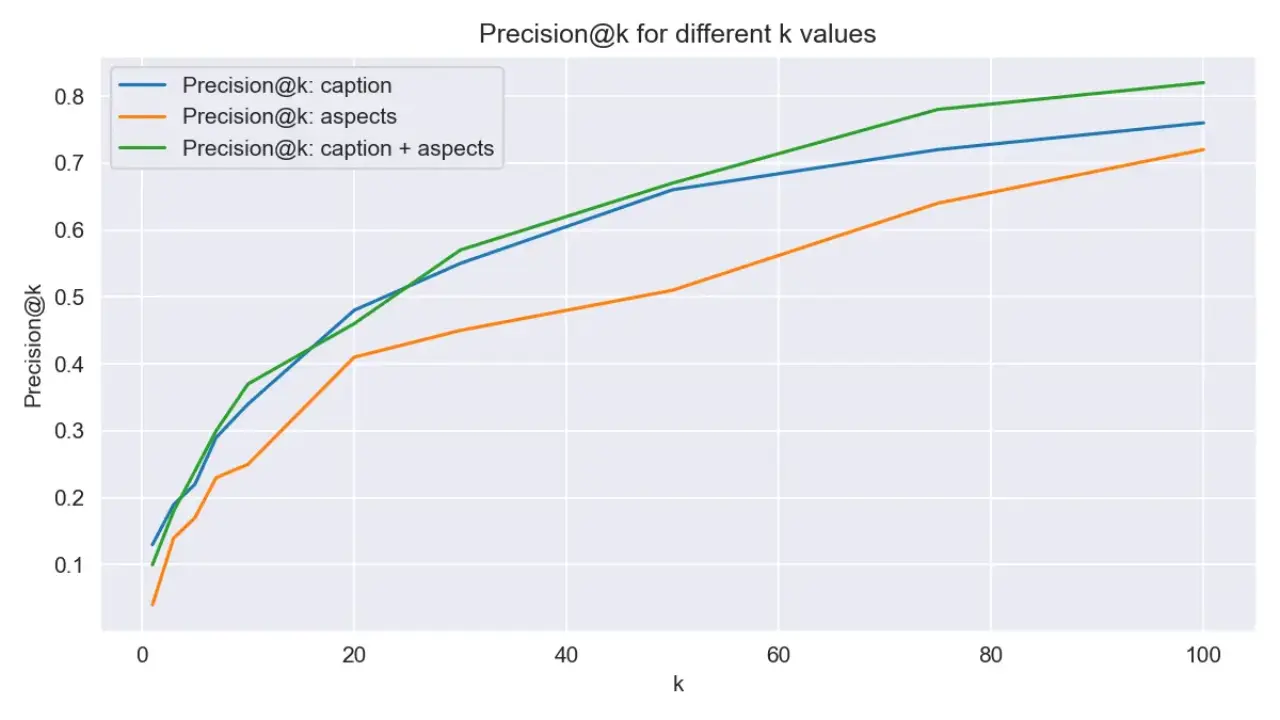
結果としては960件のデータで検索した際に,4割程度のケースで上位10件にはクエリそのものをCaptionとして持つデータが含まれるとなりました。
所感とまとめ
S3Vectorsはかなり手軽
CDK でバケットとインデックスを数行で定義でき,boto3 でそのまま put_vectors / query_vectors を呼ぶだけという,追加の管理サービス不要な開発体験が非常にシンプルだった。
プロトタイプや小〜中規模(数百万ベクトル以内)のワークロードなら,Pinecone や Weaviate を採用する前にまず S3 Vectors を検討する価値は十分ある。
CLAPの検索精度
laion/clap-htsat-unfused を HuggingFace Transformers 経由で使ったが,楽器・ジャンル・テンポなどの音楽的特徴についてはかなり的確に検索できた。一方,「悲しい」「明るい」などの感情的なクエリは若干ブレが生じることがあった。CLAP の訓練データに MusicCaps のキャプションが含まれているケースもあるため,評価は慎重に行う必要がある。
AppleSiliconでも動く
torch.backends.mps.is_available() で MPS バックエンドを自動選択するようにしており,M4 Max でも問題なく動作した。float16 は MPS 環境でブロードキャストエラーが出るため,MPS 時は float32 に切り替えている。